
 +1 844-445-5767
 +971 56-848-5757
 +91 921-208-0630
For Business & Service Inquiries
Sales Team
Project quotes, partnerships, implementation

TL;DR: Infrastructure automation uses software tools to provision, configure, manage, and monitor IT systems without manual intervention. Businesses that automate IT infrastructure cut deployment times by up to 60%, reduce unplanned downtime, lower cloud costs, and eliminate configuration drift. Core tools include Ansible, Terraform, Puppet, Chef, SaltStack, Jenkins, Red Hat Ansible Automation Platform, AWS CloudFormation, Azure Automation, and Google Cloud Infrastructure Manager.
Manual IT infrastructure management was never efficient. It was just tolerated. Servers provisioned by hand. Configuration changes applied one system at a time. Patch cycles delayed because no one has the hours to touch 300 endpoints individually. The gaps between intention and execution grow wider with every team member, every cloud account, every new workload added to the stack.
The result is predictable: inconsistent environments, configuration drift, security gaps, and the kind of unplanned downtime that carries a $300,000-per-hour price tag — a figure cited by over 90% of respondents in the ITIC 2024 Hourly Cost of Downtime Report. That number held true even for small and midsize businesses. Downtime is not a large-enterprise problem. It belongs to every organization running production systems.
Infrastructure automation changes the operating model. Instead of engineers executing repetitive tasks across distributed systems, automation platforms handle provisioning, configuration, deployment, patching, and monitoring at machine speed with consistent results. The engineer defines intent once. The system executes it everywhere.
This guide covers what infrastructure automation tools do, why organizations adopt them, which platforms lead the market, how to choose the right one, and what best practices separate a successful automation program from one that stalls after the first implementation. Whether you are a CIO weighing a full DevOps transformation or a system administrator looking to automate your first provisioning workflow, the answer is the same: start with clear intent and the right toolchain, backed by dependable Infrastructure Management Services.
Infrastructure automation is the use of software to perform IT infrastructure tasks — provisioning, configuration, deployment, monitoring, and scaling — that would otherwise require manual intervention, forming the foundation of modern Infrastructure Management Services.
Traditional infrastructure management operates on a reactive model. An engineer receives a request, logs into a system, executes changes, and documents what was done. The process is slow, inconsistent, and entirely dependent on individual knowledge. One missed step can break a production environment. One undocumented change creates a configuration that no one can reproduce.
Automated infrastructure management replaces that sequence with code-defined workflows. Infrastructure as Code (IaC) tools like Terraform let teams describe the desired state of an environment in version-controlled files. Configuration management tools like Ansible apply those configurations consistently across every node in the estate. CI/CD platforms like Jenkins trigger deployment pipelines automatically when code changes pass validation.
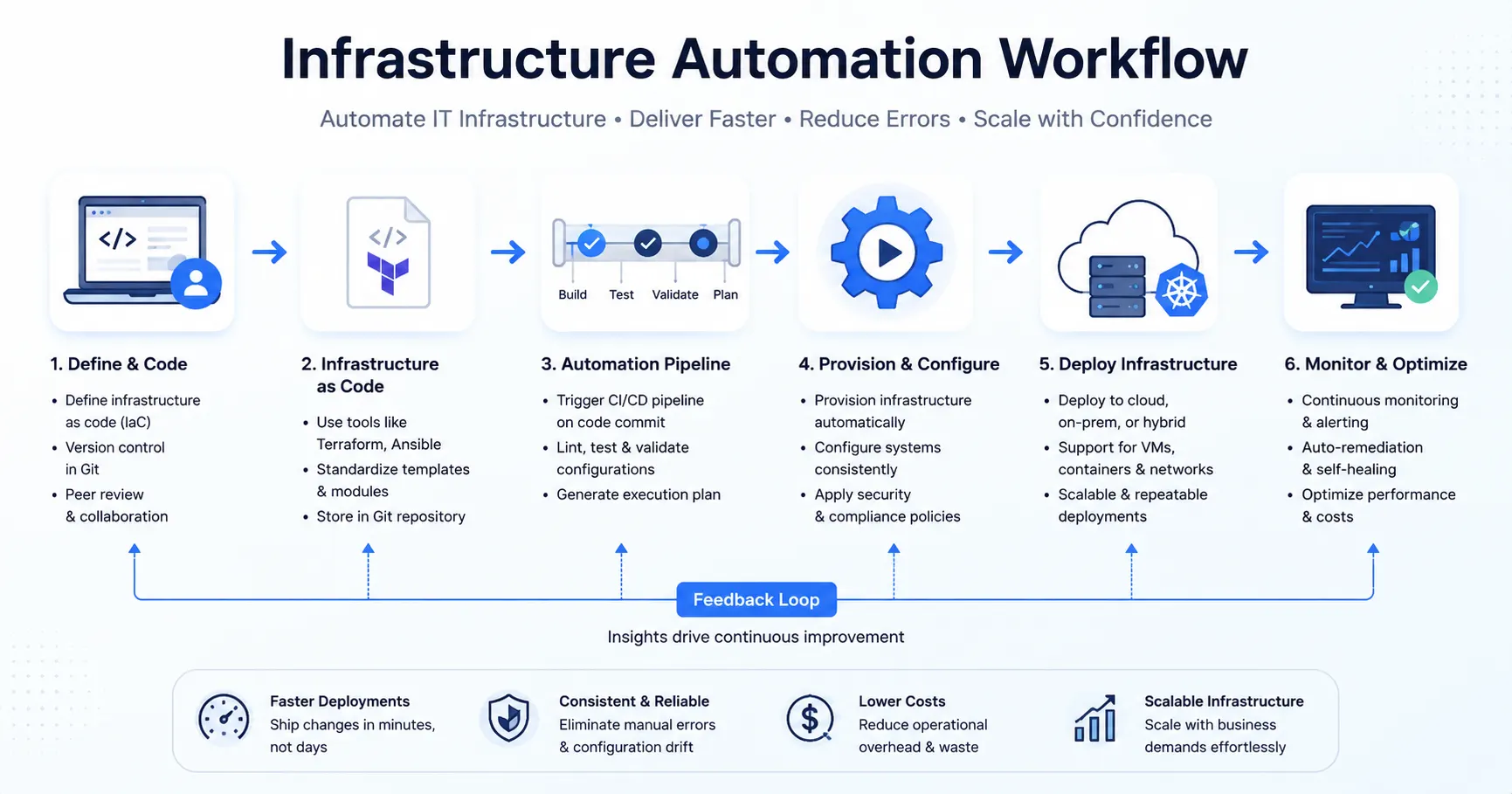
The difference between manual and automated infrastructure management:
|
Dimension |
Manual Management |
Automated Management |
|---|---|---|
|
Provisioning speed |
Hours to days |
Minutes |
|
Consistency |
Variable |
Codified and repeatable |
|
Error rate |
High (human-dependent) |
Low (logic-enforced) |
|
Auditability |
Manual documentation |
Version-controlled records |
|
Scalability |
Limited by headcount |
Unlimited within platform |
|
Recovery time |
Slow and manual |
Scripted and fast |
|
Cost |
High operational overhead |
Lower at scale |
Real-world examples of IT infrastructure automation in practice include a financial services firm that provisions 50 cloud environments in 12 minutes using Terraform modules, a healthcare organization that enforces security configurations across 2,000 endpoints nightly via Ansible playbooks, and a SaaS company that deploys code to production in 15 minutes with zero manual steps through a Jenkins CI/CD pipeline.
Key Takeaway: Infrastructure automation converts manual, error-prone operations into version-controlled, repeatable, and auditable workflows — the foundation of reliable digital infrastructure.
The pressure to automate does not come from one direction. It compounds from every layer of the organization simultaneously.
Increasing infrastructure complexity. Hybrid cloud environments, multi-cloud architectures, containerized workloads, microservices — each layer adds dependencies, configurations, and failure points, making disciplined Cloud Infrastructure Management essential. Manual oversight cannot keep pace. A single enterprise might manage resources across AWS, Azure, and on-premises data centers. Without automation, consistency is impossible.
Human error at scale. According to Uptime Institute's 2025 Annual Outage Analysis Report, human error contributed to major outages at nearly 40% of organizations — and 85% of those were caused by failing to follow procedures or by flawed processes. More people touching more systems means more opportunity for misconfiguration. Automation removes the human variable from routine operations.
Downtime costs. ITIC's 2024 data puts average downtime cost above $300,000 per hour, with 41% of respondents estimating costs above $1 million per hour. Every minute a production system is unavailable translates directly into lost revenue, productivity loss, and reputational damage — underscoring why proactive Infrastructure Monitoring matters.
Slow deployment cycles. Organizations still running manual release processes face deployment windows measured in days or weeks. Competitors operating automated CI/CD pipelines ship features daily. The velocity gap compounds over time into a market position gap.
Security and compliance risks. 84% of firms identify security as their primary cause of downtime, per ITIC 2024. Manual patch management, inconsistent access controls, and undocumented configurations create exploitable gaps, which is why organizations increasingly follow IT Infrastructure Security Best Practices. Automated security policy enforcement closes them systematically.
Operational costs. Engineering hours spent on repetitive provisioning, patching, and configuration tasks represent significant labor cost with low strategic value. Automation redirects that capacity toward work that compounds.
Manual infrastructure management is not a neutral choice. Every day without automation is a day of accumulated technical debt, inconsistent configurations, and preventable risk.
Automated CI/CD pipelines eliminate manual steps from the software delivery chain. Build, test, validate, and deploy in a single triggered workflow. SISGAIN client deployments using automated pipelines have reduced deployment cycles from four hours to 15 minutes — a 93% reduction.
Automated monitoring and self-healing configurations detect and remediate issues before they escalate to outages. Proactive alerting, automated failover, and configuration drift detection maintain system stability without waiting for an engineer to notice a problem.
Infrastructure as Code eliminates redundant provisioning work. Auto-scaling policies match resource allocation to actual demand, removing idle compute that drives cloud bills upward. Organizations implementing full infrastructure automation consistently report 30–40% reductions in cloud spend.
Security policy automation enforces consistent access controls, vulnerability patching, and compliance configurations across every managed resource. DevSecOps pipelines embed security scanning at every stage of the deployment workflow — not as an afterthought, but as an enforcement layer.
Configuration drift — the gradual divergence between intended and actual system state — is a primary source of both outages and security vulnerabilities. Automated configuration management tools like Ansible and Puppet enforce desired state continuously, detecting and correcting drift before it compounds.
Auto-scaling infrastructure responds to demand spikes in seconds. Kubernetes orchestration adjusts pod counts automatically based on load. Cloud-native automation provisions new capacity without human approval cycles. The system scales to traffic. Engineers focus on architecture, not capacity management.
Automated disaster recovery workflows execute predefined recovery sequences at machine speed. Backup verification, failover initiation, and environment rebuild from IaC templates reduce recovery time objectives from hours to minutes.
Automated compliance frameworks enforce regulatory requirements — HIPAA, PCI-DSS, SOC 2, ISO 27001 — through policy as code. Every configuration is documented, every change is logged, and every deviation triggers an alert. Compliance becomes a continuous operational state, not a periodic audit exercise.
Key Takeaway: The combined effect of infrastructure automation is not marginal efficiency improvement. It is a fundamental shift in how reliably, securely, and cost-effectively an organization operates its digital infrastructure.
The infrastructure automation market spans configuration management, provisioning, orchestration, and CI/CD. Each tool addresses a different layer of the automation stack. Understanding what each one does — and where it fits — is prerequisite to building a coherent toolchain.
Overview: Ansible is an open-source automation platform developed by Red Hat. It uses human-readable YAML playbooks to define automation tasks and applies them across managed nodes without requiring agent installation.
Best For: Configuration management, application deployment, multi-tier orchestration, and ad-hoc task automation in heterogeneous environments.
Key Features:
Advantages: Low barrier to entry, no agents to maintain, strong community support, flexible across on-premises and cloud.
Limitations: Performance at very large scale (10,000+ nodes) requires optimization. Limited native GUI without the enterprise platform. Sequential execution by default can slow complex workflows.
Overview: Terraform, developed by HashiCorp, is the leading Infrastructure as Code platform. Teams write configuration in HashiCorp Configuration Language (HCL) to provision and manage cloud, on-premises, and SaaS infrastructure.
Best For: Cloud provisioning across AWS, Azure, and GCP; multi-cloud infrastructure management; environment reproducibility.
Key Features:
Advantages: Cloud-agnostic, strong ecosystem, deterministic infrastructure changes, version-controlled state.
Limitations: State file management requires care to prevent drift. Steep learning curve for complex multi-provider configurations. Terraform Cloud adds cost for enterprise features.
Overview: Puppet is a model-driven configuration management platform that enforces desired system state through a declarative language and an agent-master architecture.
Best For: Large-scale configuration management in enterprises with established infrastructure, especially Windows and Linux environments.
Key Features:
Advantages: Strong compliance and reporting capabilities, mature enterprise support, excellent at enforcing consistent state across large fleets.
Limitations: Requires agent installation on all managed nodes. Puppet DSL has a steeper learning curve than YAML-based tools. Higher setup complexity compared to Ansible.
Overview: Chef is a Ruby-based configuration management platform that uses "recipes" and "cookbooks" to define infrastructure policy as code. Chef Infra applies those policies to managed nodes through a client-server model.
Best For: Organizations with strong Ruby expertise, complex compliance automation, and large-scale infrastructure requiring policy-driven configuration.
Key Features:
Advantages: Highly programmable, strong compliance testing integration, well-suited for complex multi-environment configurations.
Limitations: Ruby knowledge required for effective use. Higher learning curve than Ansible. Agent-based architecture adds operational overhead. Less active open-source community compared to Ansible and Terraform.
Overview: SaltStack, now integrated into VMware's portfolio as Salt Open, is an event-driven automation platform that supports both agent-based (Salt Minion) and agentless operation modes.
Best For: High-speed remote execution across large-scale infrastructure, real-time event-driven automation, and complex orchestration.
Key Features:
Advantages: Exceptional execution speed at scale, real-time responsiveness, flexible deployment modes.
Limitations: Complex initial setup. Documentation quality varies. Smaller community than Ansible. Enterprise features require Salt Enterprise licensing.
Overview: Jenkins is an open-source automation server that orchestrates CI/CD pipelines. It connects source control, build tools, testing frameworks, and deployment targets into automated delivery workflows.
Best For: CI/CD pipeline automation, build orchestration, and integration with virtually any tool in the software delivery chain.
Key Features:
Advantages: Highly extensible, large community, completely free, supports any language and platform, cloud-agnostic.
Limitations: Requires significant administration overhead for large deployments. Plugin compatibility issues can cause instability. UI is dated compared to modern alternatives like GitHub Actions.
Overview: Red Hat Ansible Automation Platform (AAP) is the enterprise-grade distribution of Ansible. It adds a GUI-based controller (formerly Ansible Tower), automation analytics, content collections, and enterprise support on top of the open-source Ansible engine.
Best For: Enterprises requiring centralized automation governance, role-based access control, audit logging, and scalable automation management across large infrastructure estates.
Key Features:
Advantages: Centralized control over distributed automation, enterprise security features, subscription-based support, Red Hat ecosystem integration.
Limitations: Subscription cost adds up for large deployments. Requires the same Ansible knowledge as the open-source version — the platform adds governance, not simplicity.
Overview: AWS CloudFormation is Amazon's native Infrastructure as Code service. Teams define AWS resource configurations in JSON or YAML templates, and CloudFormation provisions and manages those resources as stacks.
Best For: AWS-native infrastructure provisioning, stack-based resource lifecycle management, and organizations standardized on AWS.
Key Features:
Advantages: No additional cost (pay only for provisioned resources), deep AWS service integration, native rollback capabilities, well-documented.
Limitations: AWS-only. JSON/YAML template syntax can become unwieldy at scale. Limited abstraction compared to Terraform modules. CDK (Cloud Development Kit) is often preferred by developer-centric teams.
Overview: Azure Automation is Microsoft's cloud-based automation and configuration management service. It provides process automation through runbooks, configuration management through Azure Automation State Configuration (DSC), and update management.
Best For: Automating Azure and hybrid cloud operational tasks, update management across Windows and Linux systems, and configuration compliance for Azure-connected resources.
Key Features:
Advantages: Tight Azure ecosystem integration, hybrid support through Hybrid Runbook Workers, included with Azure subscriptions.
Limitations: Azure-centric, limited cross-cloud capability. Runbook development requires PowerShell or Python expertise. Scaling complex automation workflows can be challenging.
Overview: Google Cloud originally offered Deployment Manager as its native IaC service. Google now recommends Infrastructure Manager — a fully managed service built on Terraform — for infrastructure provisioning on Google Cloud, reflecting the broader industry shift toward Terraform as the standard IaC layer.
⚠️ Note: Google Cloud Deployment Manager remains available but is in maintenance mode. For new GCP infrastructure projects, Google recommends Cloud Infrastructure Manager or Terraform directly.
Best For: GCP-native infrastructure provisioning and organizations adopting Terraform-based workflows across multi-cloud environments that include Google Cloud.
Key Features (Infrastructure Manager):
Advantages: Managed Terraform removes self-hosted Terraform operational overhead, strong GCP integration, familiar HCL syntax for teams already using Terraform elsewhere.
Limitations: Relatively newer service compared to AWS CloudFormation. Limited to Google Cloud resources without extending to external Terraform providers.
|
Tool |
Best For |
Open Source |
Cloud Support |
Difficulty Level |
Pricing |
|---|---|---|---|---|---|
|
Ansible |
Configuration management, agentless automation |
Yes |
Multi-cloud |
Low |
Free (open source) / Subscription (AAP) |
|
Terraform |
Multi-cloud IaC provisioning |
Yes (BSL license) |
Multi-cloud |
Medium |
Free / Terraform Cloud paid tiers |
|
Puppet |
Large-scale config management |
Yes (open core) |
Multi-cloud |
Medium-High |
Free / Enterprise subscription |
|
Chef |
Policy-driven config management |
Yes (open core) |
Multi-cloud |
High |
Free / Commercial license |
|
SaltStack |
High-speed remote execution |
Yes (open core) |
Multi-cloud |
Medium-High |
Free / Salt Enterprise |
|
Jenkins |
CI/CD pipeline automation |
Yes |
Multi-cloud |
Medium |
Free |
|
Red Hat AAP |
Enterprise Ansible governance |
No (enterprise) |
Multi-cloud |
Medium |
Subscription |
|
AWS CloudFormation |
AWS-native IaC |
No |
AWS only |
Medium |
Free (resource costs only) |
|
Azure Automation |
Azure/hybrid operations |
No |
Azure + hybrid |
Medium |
Included in Azure |
|
GCP Infrastructure Manager |
GCP Terraform-managed IaC |
No |
GCP |
Medium |
Pay-per-use |
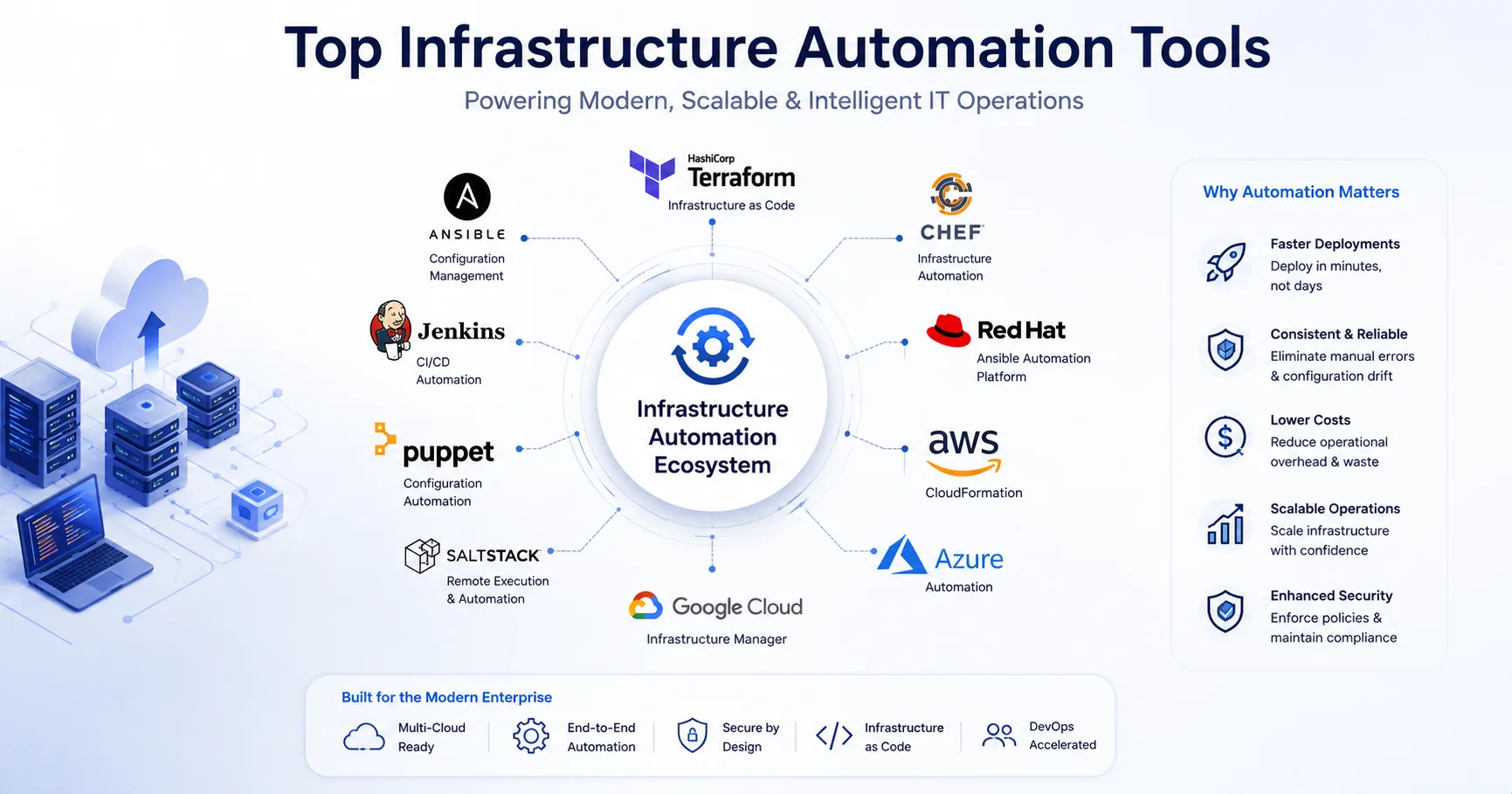
No single tool fits every organization. The right infrastructure automation software depends on where you are today and where your infrastructure needs to go.
Business size and scale. Small teams benefit from lower-complexity tools like Ansible or Terraform, which deliver results without significant platform overhead. Large enterprises with strict governance requirements may need Red Hat Ansible Automation Platform or a combination of Terraform Cloud and a dedicated CI/CD platform.
Existing infrastructure. An AWS-native organization may find CloudFormation sufficient for provisioning. A hybrid organization spanning on-premises VMware, AWS, and Azure needs a cloud-agnostic tool like Terraform or Ansible.
Cloud strategy. Single-cloud, multi-cloud, and hybrid strategies each favor different tools, and a clear Hybrid Cloud Infrastructure Management approach helps determine the right fit. Terraform is the strongest choice for multi-cloud IaC. Native cloud services (CloudFormation, Azure Automation, Infrastructure Manager) optimize for single-cloud depth.
Team expertise. Match the tool to the skills already on the team. Ansible's YAML syntax is accessible to sysadmins without deep programming experience. Chef's Ruby-based DSL requires development fluency. Forcing a team to adopt a tool far outside their skill set extends time-to-value and increases risk.
Security and compliance requirements. Regulated industries need tools with strong audit logging, RBAC, and compliance reporting. Red Hat Ansible Automation Platform, Puppet Enterprise, and Chef Automate provide enterprise-grade compliance capabilities.
Integration requirements. Evaluate how each tool integrates with your existing CI/CD pipeline, ITSM platform, monitoring stack, and cloud provider. Jenkins, GitHub Actions, and GitLab CI integrate with most IaC tools. Native cloud services integrate most deeply with their respective providers.
Budget. Open-source tools like Ansible, Terraform, and Jenkins carry zero licensing cost but require self-managed infrastructure. Enterprise platforms add subscription costs in exchange for vendor support, centralized management, and governance features.
Pro Tip: Start with a pilot project before committing to a platform. Select a well-defined, low-risk automation use case — patch management or VM provisioning — and validate the tool against your actual environment before scaling.
Infrastructure automation applies across every operational domain. The following represent the highest-impact applications:
Automation programs fail for predictable reasons. Recognizing the obstacles early prevents expensive course corrections.
Legacy systems. Old operating systems, unsupported APIs, and undocumented configurations resist automation. Solution: Map legacy dependencies first. Identify which systems can be automated with wrappers or custom modules, and which need modernization before automation is viable.
Resistance to change. Engineers who built their careers on manual administration may view automation as a threat. Solution: Frame automation as a force multiplier, not a replacement. Involve the team in tool selection and workflow design. Automate the tasks they dislike, not the work they value.
Tool complexity. Choosing the wrong tool for the team's skill level creates a skills gap that slows every subsequent automation effort. Solution: Prototype before committing. Run a 30-day pilot on a defined use case and measure time-to-competency alongside technical fit.
Skills shortage. DevOps engineers, cloud architects, and automation specialists are in short supply. Solution: Upskill existing staff through structured training, or engage a managed infrastructure services partner like SISGAIN to accelerate capability without building from scratch.
Security concerns. Automation tools require privileged access credentials. Poorly managed secrets create significant security risk. Solution: Use a secrets management platform (HashiCorp Vault, AWS Secrets Manager, Azure Key Vault) to store and rotate credentials used by automation workflows.
Integration issues. Automation tools that do not connect to existing ITSM, monitoring, or security platforms create parallel workflows that fragment visibility. Solution: Validate integrations during the pilot phase. Prefer tools with native connectors to your existing stack over those requiring custom development.
⚠️ Warning: Automating a broken process does not fix the process — it accelerates the mistakes. Before building automation workflows, document and validate the manual process. Automation should codify proven best practices, not replicate existing inefficiencies at scale.
1. Start with version control. Every automation artifact — IaC templates, playbooks, runbooks, pipeline definitions — lives in a Git repository from day one. Version control enables rollback, audit history, and collaborative development.
2. Define desired state, not procedures. Declarative automation (Terraform, Puppet, Ansible) specifies what you want, not how to get there. This approach is more resilient to environmental variation than imperative scripting.
3. Test automation before deploying to production. Use staging environments to validate IaC templates and configuration playbooks. Incorporate automated testing tools like Terratest, Molecule, and InSpec into your pipeline.
4. Implement least-privilege access for automation accounts. Automation service accounts need only the permissions required for their specific tasks. Broad administrative access creates an expansive attack surface.
5. Manage secrets with a dedicated vault. Never embed credentials in automation code. Use HashiCorp Vault, AWS Secrets Manager, or Azure Key Vault to supply secrets at runtime and rotate them automatically.
6. Use idempotent automation. Design automation workflows to produce the same result regardless of how many times they run. Idempotency prevents partial state accumulation and simplifies troubleshooting.
7. Build rollback into every deployment pipeline. Automated deployments must have automated rollback. Define rollback triggers and test the rollback path as rigorously as the forward deployment path.
8. Monitor automation execution, not just infrastructure. Track pipeline success rates, execution duration, failure patterns, and drift detection alerts. Automation health is infrastructure health.
9. Document automation logic as code comments. Automation playbooks and IaC modules should be self-documenting. Comments explaining intent, not syntax, make the codebase maintainable by team members who did not write it.
10. Establish a change review process for automation code. Automation code changes require the same review rigor as application code. Pull request reviews, automated linting, and policy validation gates prevent configuration errors from reaching production.
11. Treat automation as a product, not a project. Automation programs that succeed have owners, maintenance cycles, and roadmaps. Programs that treat automation as a one-time implementation see their toolchains drift into unmaintainability.
12. Instrument everything with observability. Prometheus, Grafana, Datadog, and the ELK Stack provide the telemetry required to understand whether automated infrastructure is performing as designed. Automation without observability is blind automation.
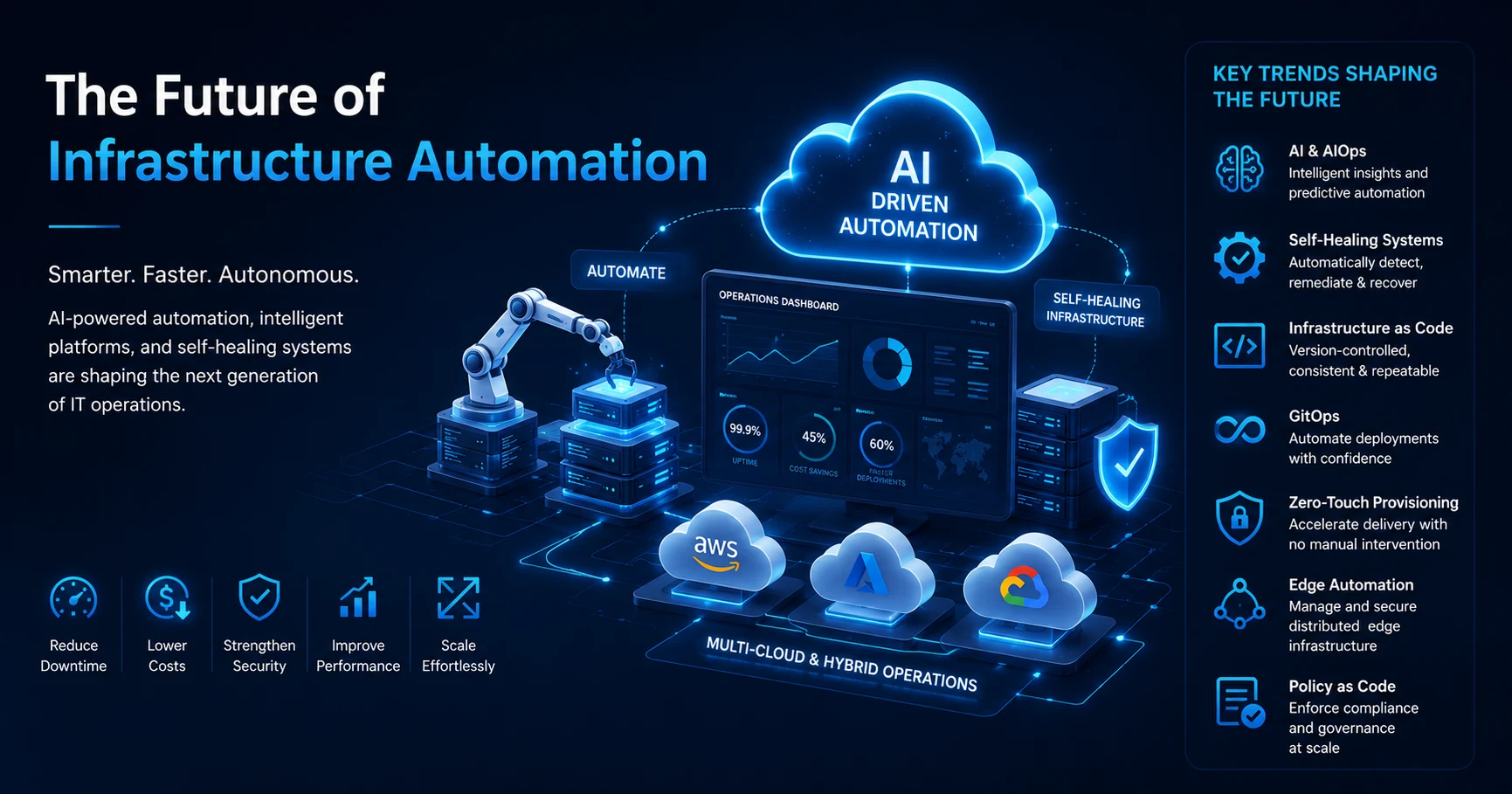
Infrastructure automation is not a static discipline. The next generation of automation capabilities is already reshaping how engineering teams manage infrastructure.
AI-driven automation. Machine learning models predict resource demand, detect anomalies, and recommend infrastructure optimizations before human operators identify the same signals. AI-assisted automation reduces the operational burden on engineering teams while improving decision accuracy.
AIOps. AIOps platforms correlate events across infrastructure, applications, and services to reduce alert noise and surface root causes faster. According to LogicMonitor (April 2026), AIOps improves signal quality by reducing noise and correlating events across domains — but insight alone does not produce action. AIOps is the intelligence layer. Execution requires additional governance.
Self-healing infrastructure. Self-healing operations detect routine failures, assemble context, and execute corrective actions within defined policy guardrails without manual intervention. Detection and diagnosis happen automatically; engineers review outcomes, not incidents. LogicMonitor describes self-healing as "the practical entry point into autonomous IT" — the first point in the maturity curve where AI agents move from recommendation to execution.
GitOps. GitOps treats Git as the single source of truth for infrastructure state. Every change to infrastructure goes through a pull request. Automated reconciliation loops detect drift between the declared state in Git and the actual state of the environment, then correct it without human intervention. ArgoCD and Flux are the leading GitOps controllers for Kubernetes environments.
Policy as Code. Security and compliance policies encoded in tools like Open Policy Agent (OPA) and HashiCorp Sentinel enforce governance rules automatically as part of the provisioning pipeline. Policy violations fail deployments before non-compliant infrastructure is created.
Zero-touch provisioning. Fully automated provisioning workflows that require zero human interaction from request to operational state are becoming the standard for cloud-native organizations. Infrastructure requests go through a self-service portal; automation handles the rest.
Edge infrastructure automation. As compute moves to the network edge — retail stores, manufacturing plants, telecom infrastructure — automation tools must manage geographically distributed nodes at scale without on-site engineering presence. Edge automation extends the same IaC and configuration management patterns from cloud to edge.
Intelligent cloud operations. AI models that optimize cloud resource allocation, predict cost overruns, and recommend architectural changes in real time are redefining FinOps. The infrastructure layer becomes self-optimizing, not just self-healing.
Designing and implementing infrastructure automation requires deep expertise across cloud platforms, DevOps toolchains, security frameworks, and enterprise architecture. SISGAIN delivers that expertise across 17+ years of cloud engineering, with 1,000+ projects delivered across 40+ countries and a 98% client satisfaction rate.
Infrastructure as Code Services. SISGAIN provisions and manages infrastructure using version-controlled Terraform, CloudFormation, and Ansible automation — consistent across environments, auditable by default.
CI/CD Pipeline Automation. Automated delivery pipelines built on Jenkins, GitHub Actions, and GitLab CI reduce deployment cycles by up to 60% and achieve 99.9% deployment reliability. SISGAIN's SaaS client benchmark: four-hour deployments reduced to 15 minutes, with 90% fewer rollbacks.
Cloud DevOps Services. Multi-cloud infrastructure optimization across AWS, Azure, and Google Cloud, with governance, cost control, and security enforcement built into every environment.
Containerization and Kubernetes Automation. Kubernetes cluster provisioning, Helm deployments, auto-scaling configuration, and 24/7 monitoring for container-native workloads, powered by dedicated Kubernetes & Containerization Services.
DevSecOps Services. Security scanning, compliance automation, identity and access management, and secrets management integrated directly into the deployment pipeline — not added after the fact.
Monitoring and Observability. Real-time infrastructure monitoring through Grafana, Prometheus, and Datadog with proactive alerting, incident response, and performance optimization.
Managed DevOps Services. 24/7 infrastructure support, proactive monitoring, patch management, and incident response, delivered through comprehensive Cloud Managed Services, for organizations that need operational continuity without expanding internal headcount.
Security-First Approach. Every automation engagement embeds security policy enforcement from the first design decision. Compliance with HIPAA, PCI-DSS, SOC 2, and industry-specific frameworks is engineered in, not bolted on.
Ready to automate your infrastructure? Request a free infrastructure audit from SISGAIN's DevOps architects. Our team reviews your current environment and delivers a modernization roadmap within 24 hours.
Manual IT infrastructure management was never a strategy. It was a starting point — and for most organizations, that starting point is long past.
Infrastructure automation tools like Terraform, Ansible, Puppet, Chef, SaltStack, Jenkins, Red Hat Ansible Automation Platform, AWS CloudFormation, and Azure Automation give engineering teams the ability to define infrastructure intent once and execute it everywhere, consistently, at speed. The organizations operating the most reliable, cost-efficient, and secure infrastructure today did not get there by hiring more people to perform more manual tasks. They built systems that operate themselves, monitored by engineers focused on architecture and strategy, not routine execution.
The path from manual to automated infrastructure is incremental. Pick one use case. Automate it well. Measure the result. Then expand.
SISGAIN's DevOps and infrastructure automation engineers have built automated cloud environments for organizations across healthcare, fintech, SaaS, logistics, and enterprise technology — across 40+ countries, with outcomes measured in uptime, deployment speed, and cost reduction. Request a free infrastructure audit and get a concrete roadmap for your automation journey within 24 hours.



Start Build Your
Next Digital Solution?
Let’s build scalable, future-ready digital solutions tailored to your business goals. Connect with our experienced technology consultants to discuss your vision, strategy, and growth opportunities — with zero obligation and complete transparency.
Get a free consultation and cost estimate for your digital solution
Our expert will contact you within 24 hours. Check your email for confirmation.
Partner with SISGAIN experts to build secure, scalable AI-powered IT Solutions that transform your business operations.












DUQE FREEZONE Quarter Deck, Queen Elizabeth 2, Mina Rashid, Dubai, UAE

100 Consilium Pl Suite 200, Scarborough, ON M1H 3E3, Canada

C-109, Sector 2, Noida, Uttar Pradesh 201301 India
Project quotes, partnerships, implementation
Open roles, referrals, campus hiring